

ONLINE BANKING UPDATE
Online Banking & Mobile App Are Getting an Update
A better Online Banking and Mobile App experience is coming in November — with more tools, more self-service options, stronger security, and improvements to many of the features you already use.
November
13–16, 2026
The important things are staying the same.
- Your Dynamic FCU account numbers will not change.
- Your existing Online Banking username will carry over.
- Your existing Online Banking password will carry over.
- You will not need to create a new Online Banking enrollment.
UPDATE STATUS: SCHEDULED
Our Online Banking and Mobile App update is scheduled to begin Friday, November 13 at 6:00 PM ET and is expected to be completed by Monday, November 16 at 8:00 AM ET.
What to expect
An Updated Online Banking Experience
Your accounts remain with Dynamic FCU throughout the update. The change affects the Online Banking and Mobile App experience — not your membership or account numbers.
Online Banking
The safest and recommended way to access Online Banking is through dynamicfcu.com.
- Visit dynamicfcu.com
- Expand the Online Banking login box
- Select Online Banking
If you bookmarked the current Online Banking address directly, we will attempt to redirect it. We still recommend starting at dynamicfcu.com.
Mobile App
iPhone & iPad: The existing Dynamic FCU app is expected to update and replace itself automatically.
Android: You will need to remove the existing Dynamic FCU app and install the updated app from Google Play after the update.
Official App Store links will be posted on this page before the update.
Built from member feedback. Over the past three years, we’ve heard from members about the tools and capabilities they’d like to have at their fingertips. This update keeps the features you use today, improves many of them, and introduces new ways to save, manage your accounts, communicate securely, and protect your information.
Preview the Updated Experience
Take a look at the updated Online Banking and Mobile App experience members will begin seeing after the November update. Use the arrows or the preview strip to move through the screenshots.
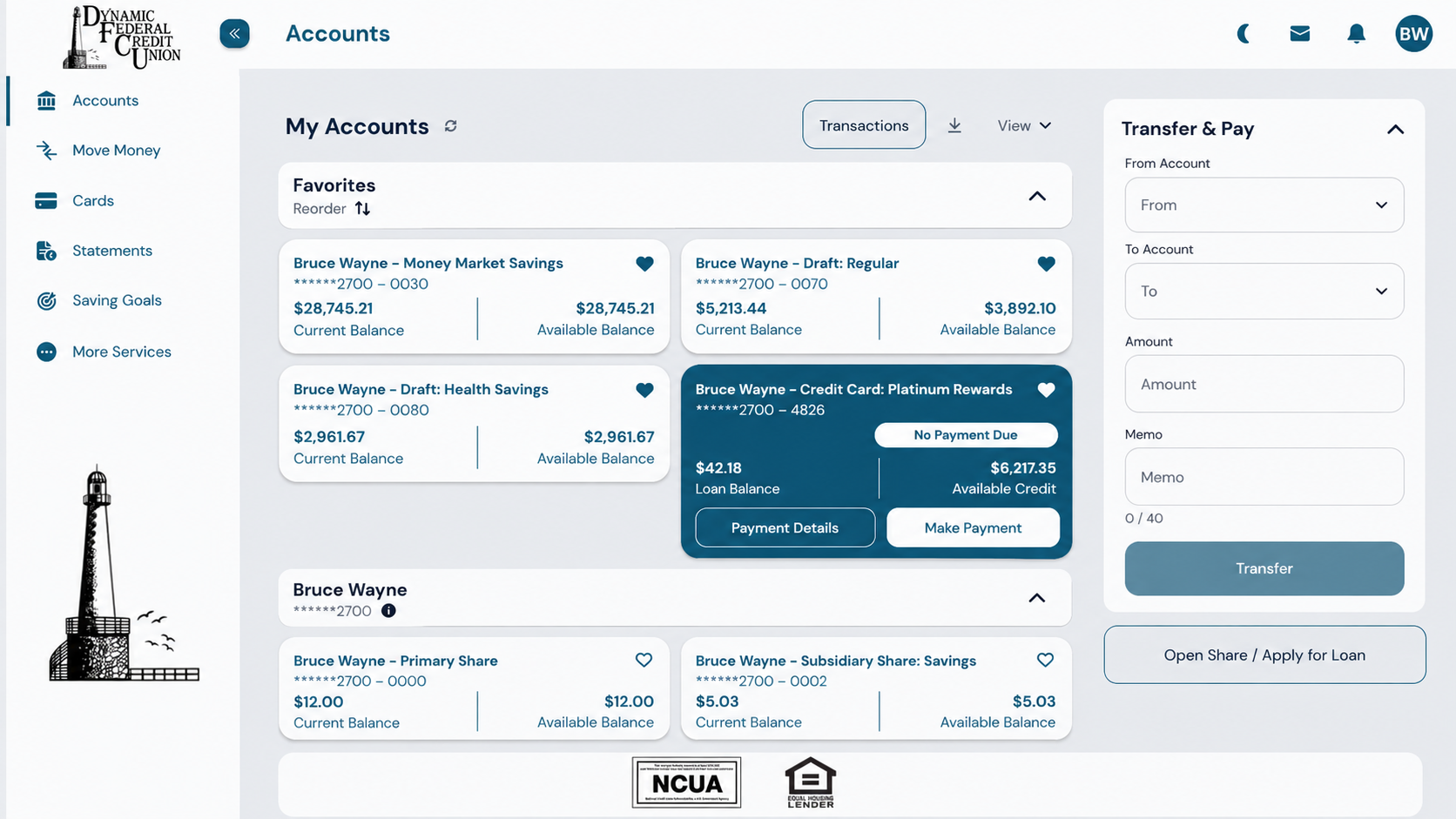
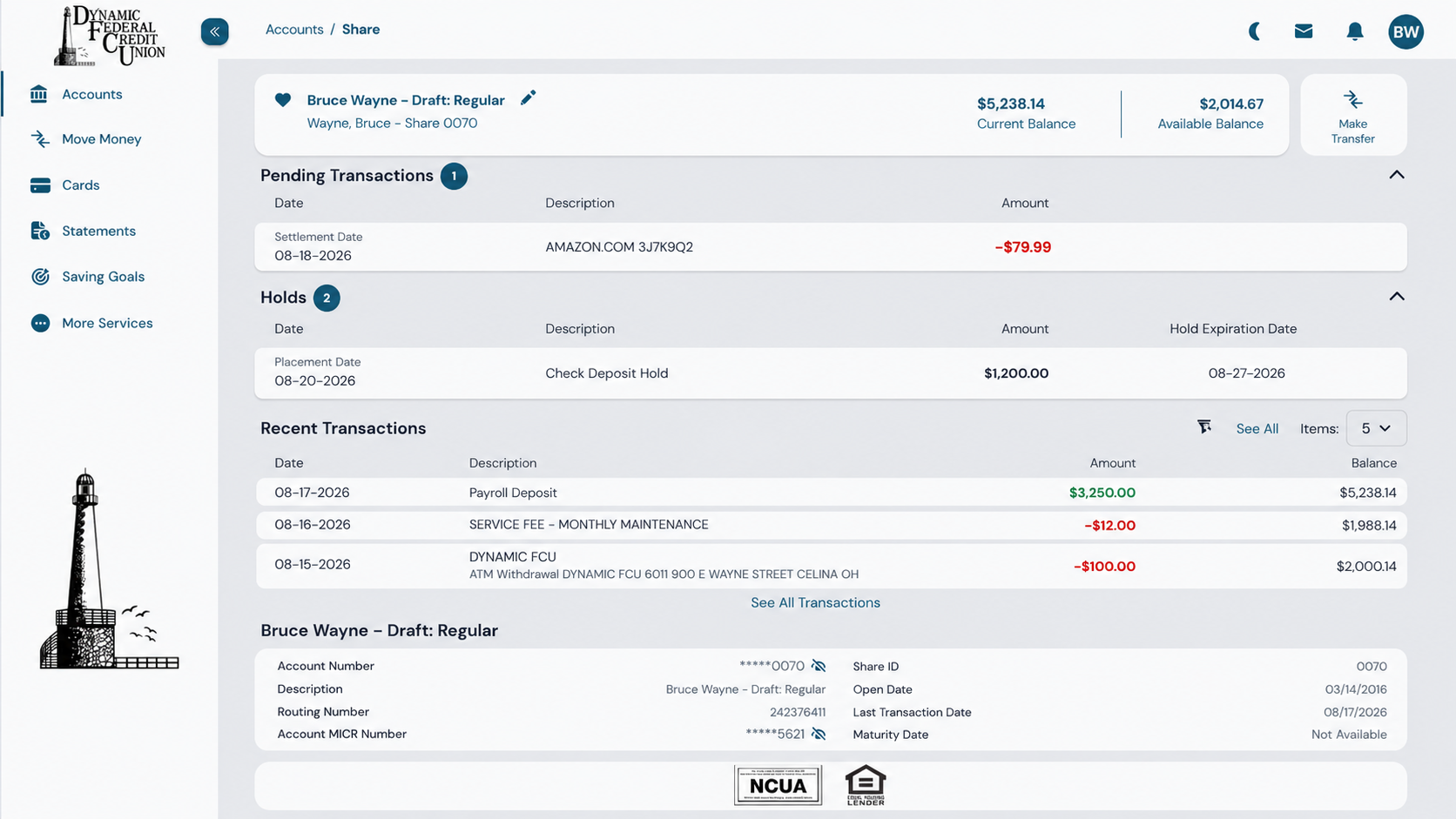
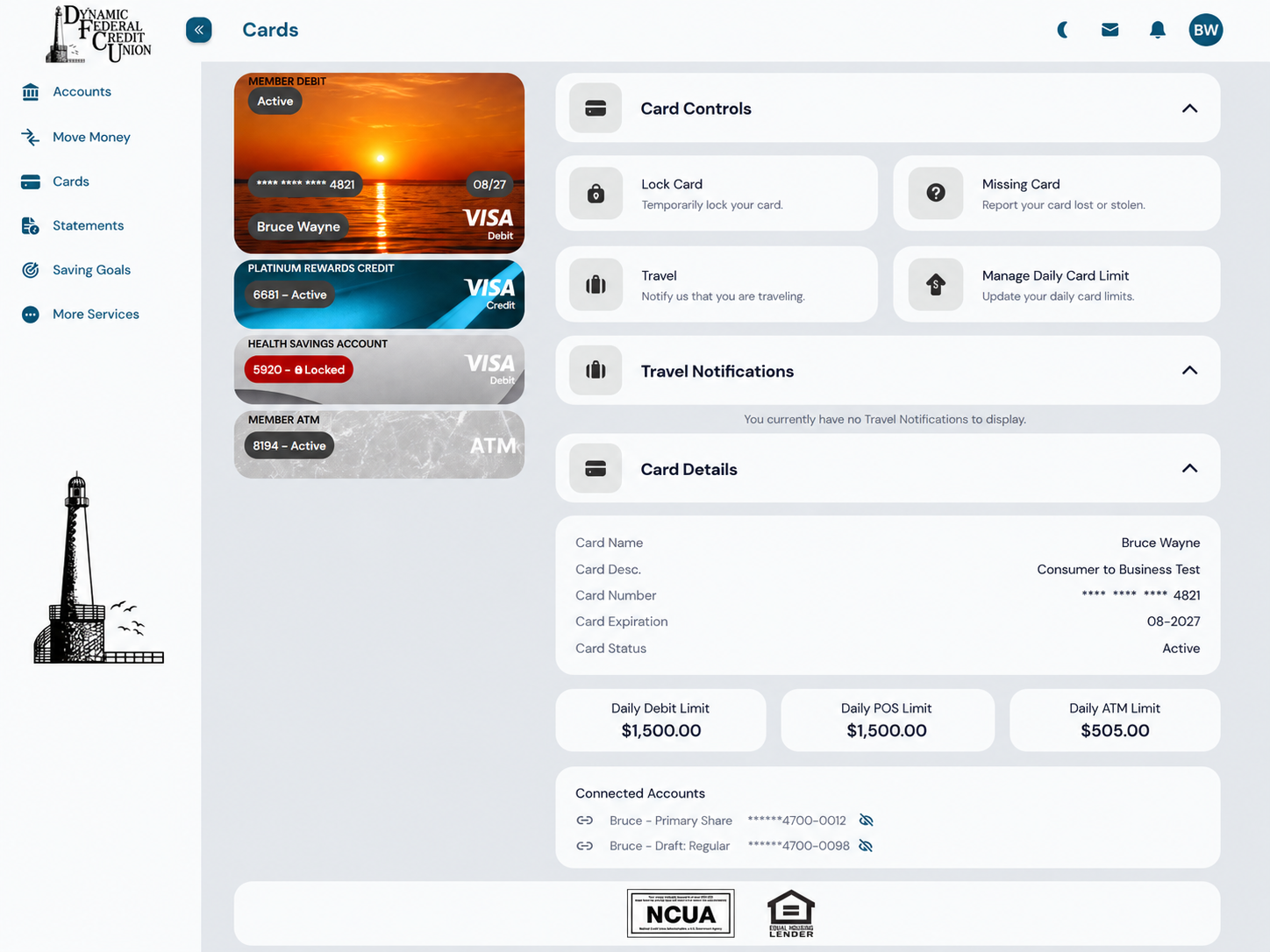
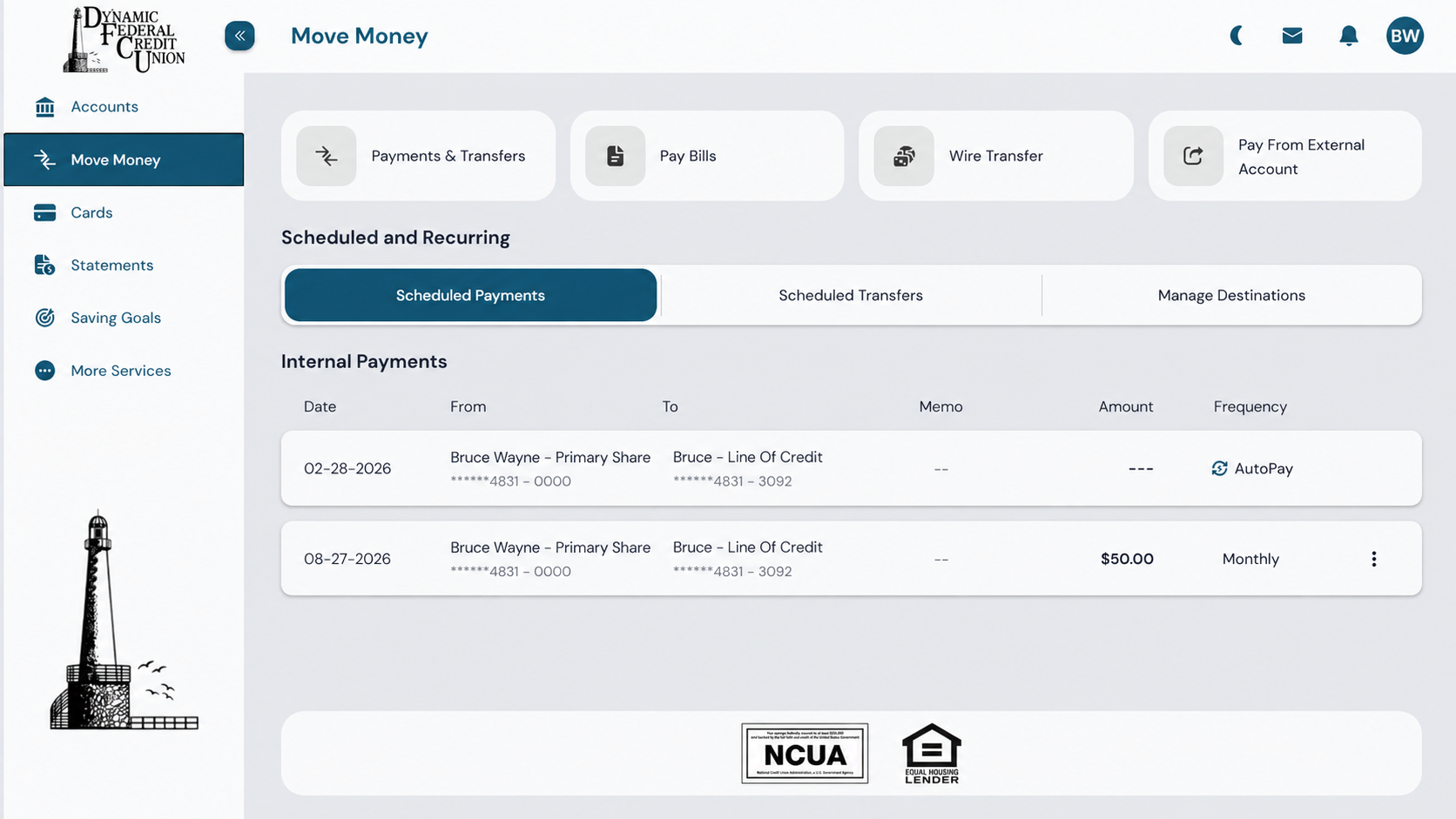
Accounts Dashboard
See balances, favorites, transfer shortcuts, and quick access to your primary banking tools from one central dashboard.
Transaction History
View pending transactions, holds, recent activity, balances, and account details in a clearer layout.
Card Controls
Manage eligible card limits, travel notifications, card details, and replacement options from one place.
Move Money
Access transfers, Bill Pay, wire transfers, external payments, and scheduled activity more easily.
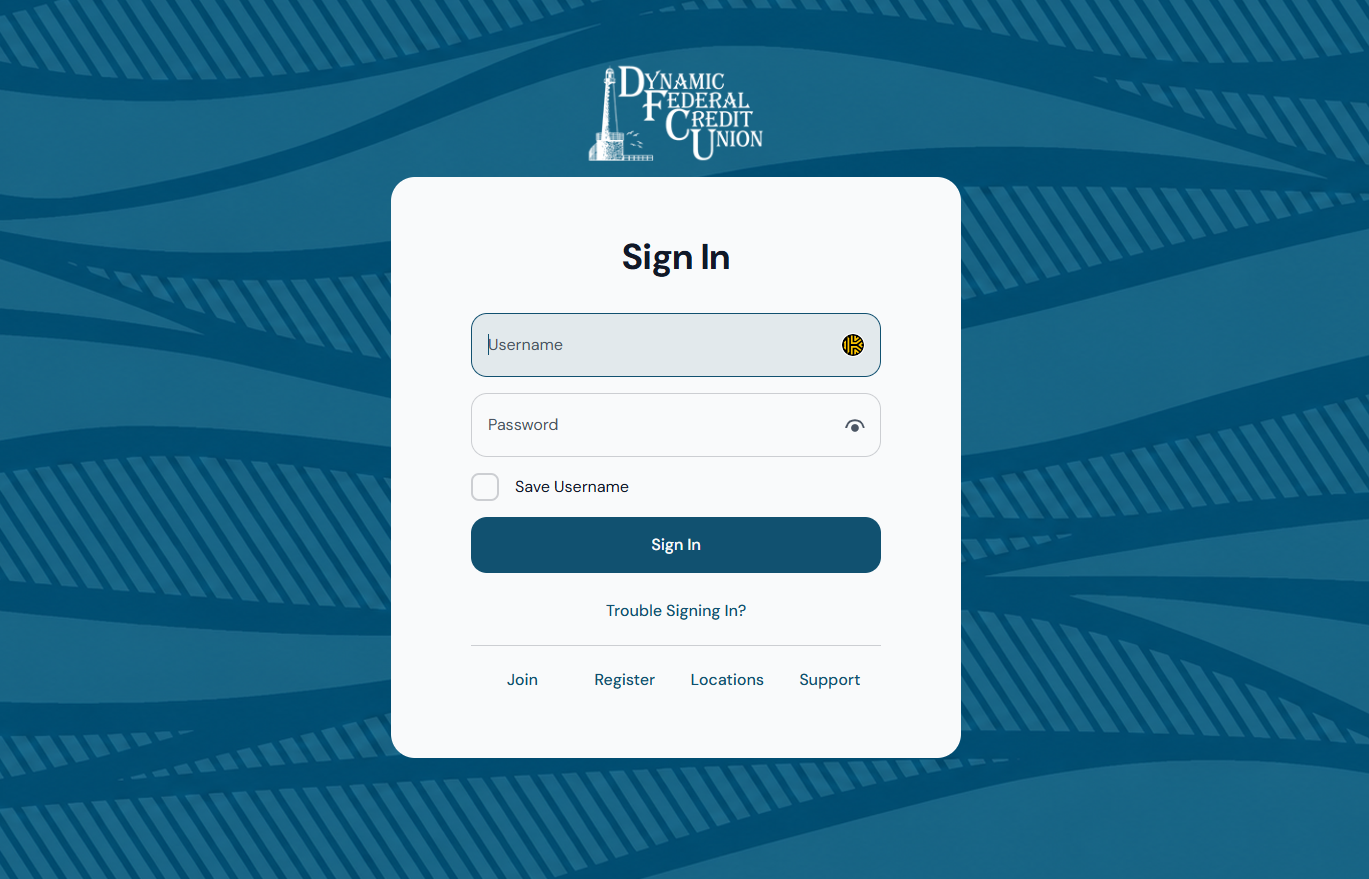
Updated Sign-In Screen
The refreshed sign-in screen keeps access familiar while preparing members for the updated Mobile App experience.
Report an eligible damaged card and begin the replacement process directly through Card Controls.
NEW
Report a Damaged Card & Issue a Replacement
More tools. More control.
New & Improved With the November Update
This isn’t just a new look. The updated Online Banking experience adds new financial tools and self-service options while making many everyday banking tasks faster and easier.
Save Smarter
NEW
Savings Goals
Create savings goals and track progress toward the things you’re saving for.
NEW
Savings Round Up
Turn eligible everyday transactions into an easy way to build savings.
NEW
Certificate Renewal Management
Manage eligible Share Certificate renewal options through Online Banking.
More Self-Service
NEW
Beneficiary Management
View and manage eligible account beneficiary information securely online.
NEW
Secure ID Upload
Safely provide updated identification without sending sensitive documents through regular email.
NEW
Stop Payments
Submit eligible stop-payment requests directly through Online Banking.
NEW
Wire Transfer Applications
Securely begin the wire transfer application process online. Additional verification may still be required.
Cards, Payments & Alerts
NEW
Manage Card Limits
View and manage eligible card limits directly through Card Controls.
NEW
Request a Card Limit Increase
Request an eligible card limit increase directly through Online Banking when additional spending flexibility is needed.
NEW
Report a Missing Card & Issue a Replacement
Report an eligible card as missing and begin the replacement process directly through Card Controls.
NEW
Report a Damaged Card & Issue a Replacement
Report an eligible damaged card and begin the replacement process directly through Card Controls.
IMPROVED
More Flexible Credit Card Payments
When making an eligible credit card payment, choose the Statement Balance, Amount Due, or enter a Custom Amount.
IMPROVED
Faster Transaction Alerts
Supported transaction alerts will be generated as soon as the transaction posts to your account, giving you faster notice of account activity.
Stronger Security
NEW
Security Advisor
Get guidance designed to help strengthen the security of your Online Banking account.
NEW
MFA for High-Risk Activity
Certain sensitive transactions and account changes may require additional verification.
NEW
Authenticator App Support
Use a compatible authenticator app as an additional multi-factor authentication option.
Mobile & Money Management
NEW
Quick Balance
Optionally view selected balance information from the app opening screen without a full Online Banking login.
NEW
Smartwatch Support
Access supported account information from compatible smartwatch applications.
NEW
Transaction Categories
Categorize transactions to get a clearer picture of where your money is going.
NEW
Attach Receipts
Attach eligible receipts to transactions for budgeting, reimbursements, and recordkeeping.
NEW
Secure Messages With Attachments
Exchange eligible documents and information with Dynamic FCU through Secure Messaging.
Report an eligible damaged card and begin the replacement process directly through Card Controls.
NEW
Report a Damaged Card & Issue a Replacement
Mobile & Money Management
No loss of existing features
Everything You Use Today Is Staying
The Online Banking features you use today will continue to be available, and many are receiving meaningful improvements.
Accounts & History
- Dashboard & Account Balances
- Transaction History — Improved
- eStatements
- Custom Sub-Account Names
Transfers & Payments
- Transfers & Payments — Improved
- Scheduled Transfers — Improved
- External Loan Payments
- Member-to-Member Transfers — Improved
- Bill Pay
Mobile, Cards & Rewards
- Mobile Check Deposit — Improved
- Card Controls — Improved
- Credit Cardholder Rewards — Improved
- Biometric Login
- Shared Branch & ATM Locator — Improved
Communication & Profile
- Alerts — Improved
- Secure Messaging — Improved
- Address Changes — Improved
- Contact Information Changes — Improved
Certain sensitive transactions and account changes may require additional verification.
NEW
NEW
MFA for High-Risk Activity
Report an eligible damaged card and begin the replacement process directly through Card Controls.
Security Advisor
Use a compatible authenticator app as an additional multi-factor authentication option.
Authenticator App Support
Get guidance designed to help strengthen the security of your Online Banking account.
NEW
Report a Damaged Card & Issue a Replacement
NEW
Mobile & Money Management
Action required
Prepare for the Update
A few steps before November 13 can make your first login and update weekend much easier.
01
Verify Your Contact Information
Make sure your mobile number and email address are current so you can receive your first-login verification code.
02
Know Your Username & Password
Your existing credentials will carry over. Recover or reset forgotten credentials before November 13.
03
Review Bill Pay & Transfers
Complete or schedule time-sensitive activity before 2:00 PM ET Friday, November 13.
04
Make Sure Your Cards Are Active
Cards will continue working, but Online Banking card-management tools will be unavailable during the update.
04
Plan Ahead for Check Deposits
Mobile Check Deposit will be unavailable from Friday at 6:00 PM through Monday at 8:00 AM.
06
Prepare Connected Financial Apps
Quicken, QuickBooks, Plaid and similar connections will need to be re-linked after the update.
Mobile Check Deposit will be unavailable from Friday at 6:00 PM through Monday at 8:00 AM.
Plan Ahead for Check Deposits
Quicken, QuickBooks, Plaid and similar connections will need to be re-linked after the update.
Prepare Connected Financial Apps
Certain sensitive transactions and account changes may require additional verification.
NEW
NEW
MFA for High-Risk Activity
Report an eligible damaged card and begin the replacement process directly through Card Controls.
Security Advisor
Use a compatible authenticator app as an additional multi-factor authentication option.
Authenticator App Support
Get guidance designed to help strengthen the security of your Online Banking account.
NEW
Report a Damaged Card & Issue a Replacement
NEW
Mobile & Money Management
02
04
06
Update weekend
What Works During the Update?
The Online Banking outage does not mean your Dynamic FCU accounts stop working.
Still Available
- Debit cards
- ATM transactions
- ACH transactions
- Previously scheduled transfers
- Debit cards
- ATM transactions
- ACH transactions
- Previously scheduled transfers
Temporarily Unavailable
- Online Banking
- Current balance/transaction views
- Online loan payments
- Mobile Check Deposit
- Online credential recovery
- Dynamic FCU Mobile App
- New Online Banking transfers
- Bill Pay access
- Card controls
Online Banking outage: Friday, November 13 at 6:00 PM ET → Monday, November 16 at 8:00 AM ET
Dynamic FCU will remain open during normal Friday and Saturday business hours during the update weekend.
Get Ready
Verify contact information and credentials, activate cards if needed, review Bill Pay and scheduled transfers, and plan any Mobile Check Deposits.
Important dates
Your Update Timeline
Now – Thursday, November 12
Get Ready
Verify contact information and credentials, activate cards if needed, review Bill Pay and scheduled transfers, and plan any Mobile Check Deposits.
Friday, November 13 · 2:00 PM ET
Bill Pay Access Ends
Complete time-sensitive Bill Pay activity before this cutoff. Scheduled transfers created by 2:00 PM will carry over and continue to process.
Saturday, November 14
Dynamic FCU Open Normal Saturday Hours
Our office remains available during normal Saturday business hours while the Online Banking update continues.
Monday, November 16 · 8:00 AM ET
Updated Online Banking Goes Live
Online Banking, Bill Pay, and Mobile Check Deposit are scheduled to return. Log in with your existing username and password and complete first-login verification.
Monday, November 30 or Later
Third-Party Connections
Quicken, QuickBooks, Plaid-connected applications and other third-party services may begin becoming available for reconnection. Some providers may take longer.
Mobile Check Deposit will be unavailable from Friday at 6:00 PM through Monday at 8:00 AM.
Plan Ahead for Check Deposits
Quicken, QuickBooks, Plaid and similar connections will need to be re-linked after the update.
Prepare Connected Financial Apps
Certain sensitive transactions and account changes may require additional verification.
NEW
NEW
MFA for High-Risk Activity
Report an eligible damaged card and begin the replacement process directly through Card Controls.
Security Advisor
Use a compatible authenticator app as an additional multi-factor authentication option.
Authenticator App Support
Get guidance designed to help strengthen the security of your Online Banking account.
NEW
Report a Damaged Card & Issue a Replacement
NEW
Mobile & Money Management
02
04
06
Dynamic FCU Mobile App
What Mobile Users Need to Know
Continue using the current app normally until the update begins on November 13.
Apple iPhone & iPad
Existing App Updates
The Dynamic FCU Mobile App is expected to update and replace the existing app automatically.
After the update, confirm that you are running the latest version available through the Apple App Store.
App Store Link Coming Soon
Android
New App Download Required
- Remove the existing Dynamic FCU Mobile App.
- Open the Google Play Store.
- Download the new Dynamic FCU Mobile App.
- Log in using your existing Online Banking username and password.
Google Play Link Coming Soon
Biometric Login: Face ID, Touch ID and fingerprint authentication will need to be re-enabled after your first successful login to the updated app.
Download safely: Only install the Dynamic FCU app using official links from dynamicfcu.com, the Apple App Store or Google Play.
Mobile Check Deposit will be unavailable from Friday at 6:00 PM through Monday at 8:00 AM.
Plan Ahead for Check Deposits
Quicken, QuickBooks, Plaid and similar connections will need to be re-linked after the update.
Prepare Connected Financial Apps
Certain sensitive transactions and account changes may require additional verification.
NEW
NEW
MFA for High-Risk Activity
Report an eligible damaged card and begin the replacement process directly through Card Controls.
Security Advisor
Use a compatible authenticator app as an additional multi-factor authentication option.
Authenticator App Support
Get guidance designed to help strengthen the security of your Online Banking account.
NEW
Report a Damaged Card & Issue a Replacement
NEW
Mobile & Money Management
02
04
06
Biometric Login: Face ID, Touch ID and fingerprint authentication will need to be re-enabled after your first successful login to the updated app.
Special considerations
A Few Things to Know Before Update Weekend
Bill Pay
Existing App Updates
Bill Pay access will be unavailable from 2:00 PM ET Friday, November 13 through 8:00 AM ET Monday, November 16.
Your payees, recurring payments, scheduled payments, and eBills will carry over to the updated environment.
Mobile Check Deposit
Mobile Check Deposit will be unavailable from 6:00 PM ET Friday, November 13 through 8:00 AM ET Monday, November 16.
During the outage you may visit Dynamic FCU during normal business hours, use a participating Shared Branch, or use an ATM that accepts check deposits.
Quicken, QuickBooks, Plaid & Other Financial Apps
Third-party financial applications and services will need to be reconnected or re-linked after the Online Banking update.
We currently anticipate that these connections may not become available until November 30, 2026 at the earliest. Some providers may take longer while they refresh their systems and financial institution directories.
Dynamic FCU has proactively notified major providers, including Intuit and Plaid, but each third-party provider ultimately controls the timing of its own update.
Do not repeatedly enter your Online Banking credentials into a third-party application if the updated Dynamic FCU connection is not yet available.
Browser & Device Requirements
For the best security and compatibility, use a current version of a modern web browser and keep your computer or mobile device operating system up to date.
Older browsers and operating systems may not support all features. Specific supported browser and mobile OS requirements will be posted before the November update.
Frequently asked questions
Questions About the Update
Select a question below for more information.
Login & Security
Will my Online Banking username change?
No. Your existing Online Banking username will carry over. If you have forgotten it, we strongly recommend recovering it before November 13.
Will my password still work?
Yes. Your existing Online Banking password will carry over. If you have forgotten it, reset it through the current Online Banking system before the update begins.
Will I need to enroll in Online Banking again?
No. Your existing enrollment will carry over. Do not create a new enrollment after the update; use your existing username and password.
Will I need a verification code when I first log in?
Yes. Your first login will require multi-factor authentication. A security code will be sent using the email address or mobile phone number associated with your account.
Will I be able to use an authenticator app?
Yes. The updated Online Banking system will support a compatible authenticator app in addition to supported methods such as text message or email.
Will Face ID, Touch ID, or fingerprint login carry over?
No. Biometric login will need to be re-enabled after you successfully log in to the updated Mobile App and complete the required security verification.
Accounts, Payments & Statements
Will my account number change?
No. Your Dynamic FCU account number will remain the same.
Will my account and transaction history transfer?
Yes. Your account and transaction history will transfer to the updated Online Banking system.
Will my eStatements still be available?
Yes. Your previous 24 months of eStatements will remain available after the update.
What happens to my scheduled transfers?
Scheduled transfers will continue to process during the update. Any transfer scheduled by 2:00 PM ET Friday, November 13 will carry over to the updated system and remain available after the update.
What happens to Bill Pay?
Bill Pay access will be unavailable from 2:00 PM ET Friday, November 13 through 8:00 AM ET Monday, November 16. Payees, recurring payments, scheduled payments, and eBills will carry over.
Will my alerts carry over?
Yes. Your existing alerts will carry over and will continue to process during the update. You will not need to recreate them. After the update, supported transaction alerts will also be faster and will be generated as soon as the transaction posts to your account.
Update Weekend & Mobile App
When is Online Banking changing?
The update begins at 6:00 PM ET Friday, November 13, 2026. Updated Online Banking and Mobile App access is scheduled to become available at 8:00 AM ET Monday, November 16, 2026.
Do I need to download a new Mobile App?
iPhone/iPad: the existing app is expected to update and replace itself automatically. Android: you will need to remove the existing app and download the new app from Google Play.
Will my debit and credit cards still work?
Yes. Your Dynamic FCU debit and credit cards will continue to work. Online Banking card controls may be temporarily unavailable, so activate any card that needs activated before the update begins.
Will direct deposits and ACH transactions continue?
Yes. Direct deposits and ACH transactions will continue to process during the Online Banking update.
Will checks continue to work?
Yes. The Online Banking update does not affect your ability to use checks drawn on your Dynamic FCU account.
Will Mobile Check Deposit be available?
Not during the update window. Mobile Check Deposit will be unavailable beginning at 6:00 PM ET Friday and is scheduled to return at 8:00 AM ET Monday.
Will Dynamic FCU be open during the update?
Yes. Dynamic Federal Credit Union will maintain normal Friday and Saturday business hours during the update weekend.
Third-Party Apps & Devices
Will Quicken, QuickBooks, Plaid, or other financial apps continue to work?
Not immediately. These services will need to reconnect to Dynamic FCU after the update. We currently anticipate connections may not become available until November 30, 2026 at the earliest, and some providers may take longer.
Dynamic FCU has notified major providers, including Intuit and Plaid, but each provider controls the timing of its own update.
What browser should I use?
For the best security and compatibility, use a current version of a modern web browser and keep your computer or mobile device operating system up to date. Specific supported requirements will be posted before the update.
What if I forget my username or password?
If possible, take care of this before November 13. Use the username recovery or password reset options in the current Online Banking system or contact Dynamic FCU for assistance.
Special considerations
Protect Yourself During the Update
Technology updates can give scammers a believable reason to send phishing emails, texts, or make fraudulent phone calls. Be cautious of anyone claiming you must immediately provide sensitive information because of the Online Banking update.
Safest login path: dynamicfcu.com → Online Banking
If Dynamic FCU contacts you unexpectedly, we will never ask you to provide:
- Your full account number
- Your account or MICR information printed on your checks
- Your full Social Security number
- Your Online Banking username or password
- Your full debit or credit card number or PIN
- Your card CVV or security code
- A one-time verification code for a login or transaction you did not initiate
Never share a verification code with someone who contacts you. Enter a first-login verification code only into the official Dynamic FCU Online Banking system or Mobile App.
About remote support:
Dynamic FCU IT staff may use remote-support tools only when you have requested or knowingly authorized assistance and are actively working with an identified Dynamic FCU staff member. Never grant remote access because of an unexpected phone call, text, email, pop-up, or website message.
If something seems suspicious, stop and contact Dynamic FCU directly at (419) 586-5522.
Need help?
More Information Is Coming
We’ll continue updating this page with first-login instructions, App Store links, final device requirements, troubleshooting information, and update weekend status updates.
Call
(419) 586-5522 or email
info@dynamicfederalcu.com.
First Login Instructions — Coming Soon
Troubleshooting — Coming Soon
Last updated: August
20, 2026